At Spantrix, we're all about providing our customers with blazing fast, reliable web hosting. But have you ever wondered about those "inode" limits we have in place? Don't worry, they're not as complicated as they sound!
What's an Inode?
Think of an inode as a fingerprint for every file and folder on your website. It's a tiny data structure that stores information about that file, like where it's located on our servers, who has permission to access it, and other important metadata.
Why Do We Limit Inodes? Without inode limits, it would be like having an unlimited open bar at a party - things would get out of hand pretty quickly! Some websites could have millions upon millions of tiny files, soaking up all the server resources and grinding everything to a halt.
By setting reasonable inode limits on our shared and reseller hosting packages, we ensure that each customer gets their fair share of resources. This keeps our servers humming along at top speeds for everyone.
Most Websites Are A-OK For the vast majority of our customers, inodes are nothing to lose sleep over. An average small business WordPress site only uses around 5,000 inodes, which is well within the limits (250,000 inodes) of our shared hosting plans.
How to Check your Inode Limit
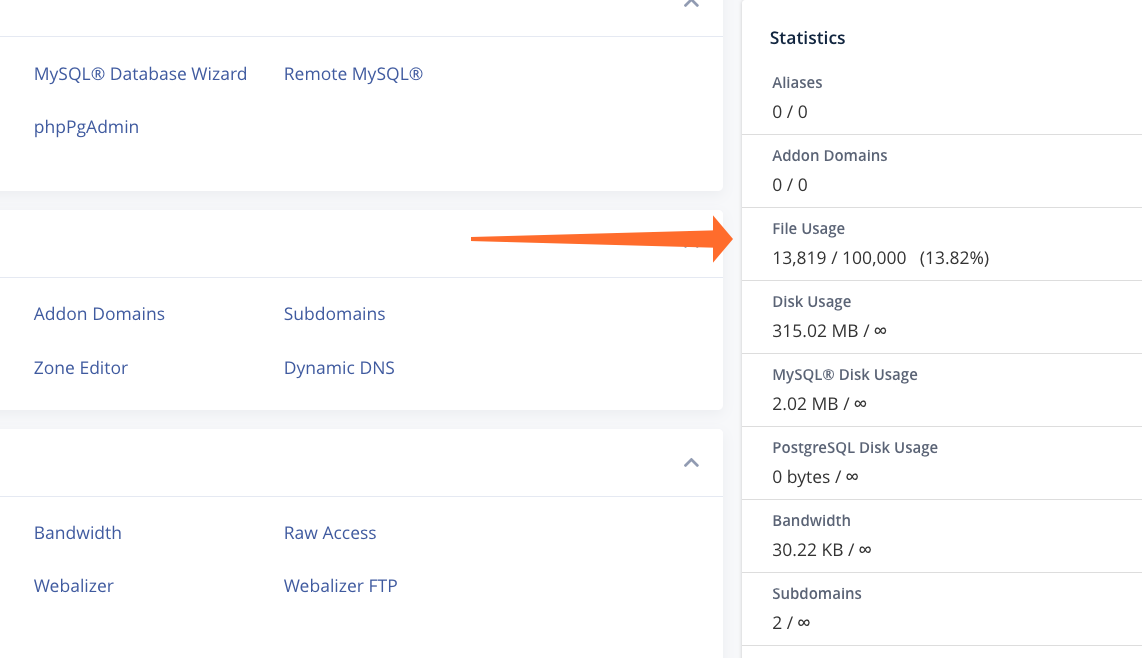
You can locate an inode usage counter in cPanel, situated within the left-hand column where your account's usage limits are logged. (See image below for reference)
You may use more inodes if you:
- Have a bunch of old, unnecessary files hanging around
- Use caching plugins that create lots of cache files
- Store tons of emails on the server instead of downloading them
Reducing Inode Usage
If you've hit your inode limit, not to worry! Here are some friendly tips to reduce your inode usage:
Declutter Unnecessary Files and Folders
Take a few minutes to go through your files and folders. If you come across old backups, testing or staging files that are no longer needed, feel free to delete or download them locally. A little spring cleaning can go a long way!
Tidy Up Your Email Inbox
Old emails can quickly pile up and take up valuable space. Consider clearing out any spam, trash, or sent emails that you no longer need. This simple step can make a big difference in reducing your inode count.
Clear Those Cache Files
Many content management systems (CMS) like WordPress and Joomla use cache files to improve loading times. While convenient, these files can accumulate and increase your inode usage. Keep an eye on your cache folders and clear them out periodically to keep things running smoothly.
Streamline Software Installations
Take a look at the software and applications you have installed. If there are any you're no longer using, consider uninstalling them. Minimizing unnecessary installations can help keep your inode usage in check.
Hitting the Limit
In the rare case that you do max out your inodes after some spring cleaning, your website may still function, but you'll see a warning to bring that number down.
If you're unable to free up enough inodes, we've got some upgrade options that can give your website some extra breathing room.
For our biggest customers who have truly outgrown shared hosting, a VPS or dedicated server with no inode limits might be the perfect solution.
We're Here to Help! At the end of the day, those inode limits are in place to ensure premium performance for all of our customers. A little routine file maintenance makes a world of difference.
If you ever have any questions about inodes or need some advice on keeping your account in shape, our expert support team is just a click away!

