1. Log in to your cPanel account.
2. In the Databases section, click on MySQL Databases.

3. In the New Database field, enter a name for the new database you wish to create.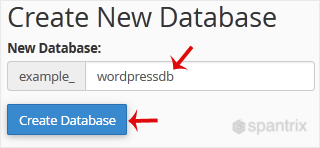
4. Click on Create Database.
- 0 Utenti hanno trovato utile questa risposta
1. Log in to your cPanel account.
2. In the Databases section, click on MySQL Databases.
3. In the New Database field, enter a name for the new database you wish to create.
4. Click on Create Database.
Do you need a professional to handle the design of your website without breaking the bank? You have one! We design beautiful, mobile responsive and search engine optimized websites at budget-friendly prices

